Book a ride with InDrive and stand a chance to win anything from a scooter to a smartwatch.

InDrive, a shared mobility service provider in Nepal, has launched a new campaign for passengers, ‘Ride More, Win More’.

Passengers will have the opportunity to win attractive prizes in the competition, which will run from 27th of July to 14th of Bhadra.

To participate in the campaign, users will have to book a ride through the InDrive app. 3 rides will be worth 1 ticket.

The competition is offering 10 Yadia E8S Pro electric scooters and 30 Ultima Watch Circle smartwatches as prizes.

Rita Pokharel, Director of InDrive Nepal, said that this campaign is a special initiative as a reflection of the trust shown by users in InDrive.

“‘Ride More, Win More’ is a special initiative to thank our beloved users for the trust they have shown in us. Through this scheme, we also invite new users to experience the freedom that comes with our service. The more rides, the more chances and opportunities to win,” she said.

This exciting scheme is open to all users. After the scheme is completed, the names of the winners among those who participated in the scheme through a lucky draw will be made public on Bhadra 20 through Indrive’s official Facebook, Instagram and TikTok pages.

Flying car arrives in Kathmandu, can be seen at NADA Auto Show

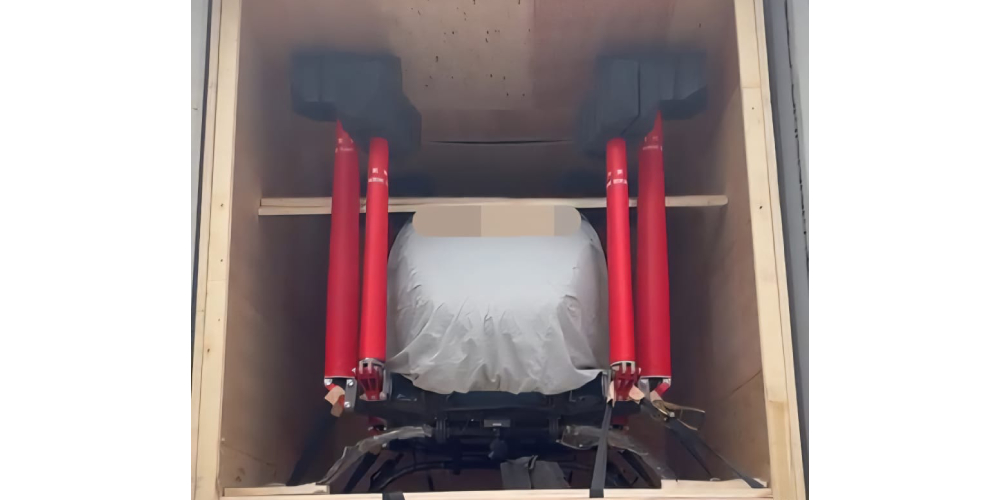
Deepal’s flying car (flying taxi) and state-of-the-art Unitary robots have arrived in Kathmandu. The flying car and state-of-the-art Unitary robots that have arrived in Nepal will be on display at the NADA Auto Show 2025.

The NADA Automobiles Association of Nepal has announced that flying cars and state-of-the-art unitary robots have arrived in Kathmandu, overcoming natural disasters and unexpected challenges in the Tatopani region.

These high-tech products are being publicly exhibited in Nepal for the first time. The 17th edition of the NADA Auto Show is not just an exhibition, it is a living testament to our country’s determination, innovation and vision for the future, says NADA.

The NADA Auto Show is taking place at Bhrikutimandap in Kathmandu from the 3rd to the 8th.

DishHome customers get 15 percent discount on Pokhara’s lakeside retreat

DishHome is offering its customers special discounts on accommodation and meals at The Lakeside Retreat in Pokhara. DishHome recently partnered with the retreat, managed by IME Hospitality, for this.

Accordingly, active DishHome customers will get 15 percent discount on accommodation and food and beverages. To avail this discount facility, the customer will have to show the virtual privilege card through the ‘My DishHome app’ on their mobile. 

The discount will be applied immediately upon presentation of the card at the retreat located at Lakeside, Pokhara.

This partnership is part of DishHome’s commitment to providing its customers with other lifestyle benefits and special experiences, not just internet and television services, according to a statement from DishHome.

According to the company, customers can get the privilege card by downloading the ‘My DishHome app’ from the Google Play Store or Apple’s App Store and logging in with their customer ID or registered mobile number.

Is VPN Safe for Everyday Users?

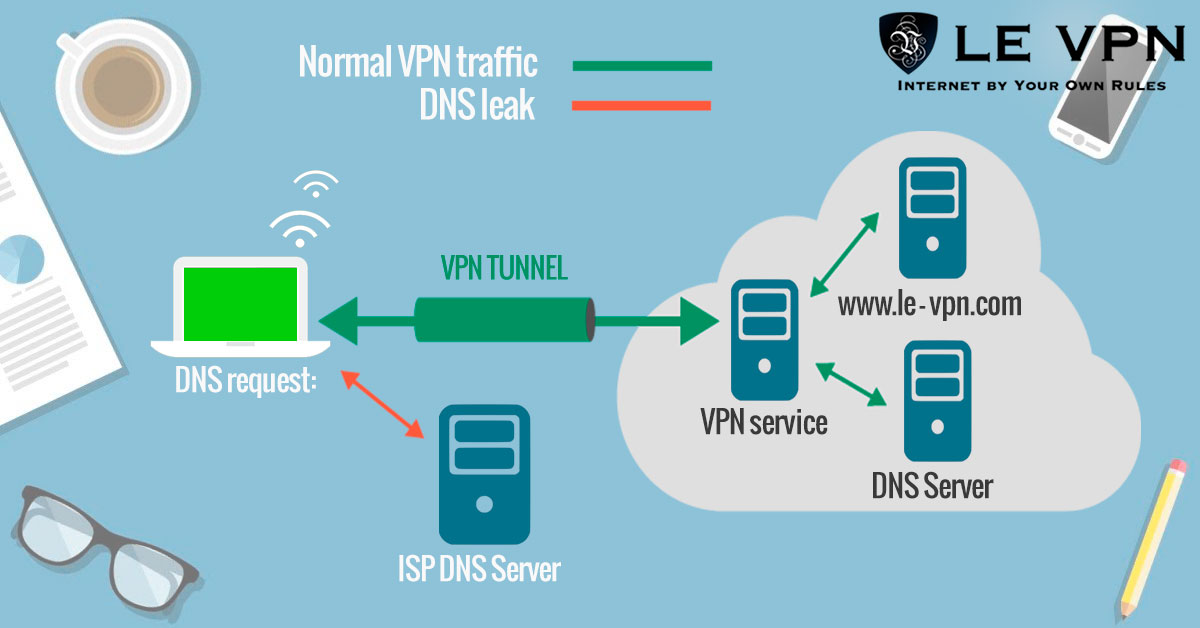
In a world where online privacy concerns are growing, Virtual Private Networks (VPNs) have become a popular tool for safeguarding personal data. For the average user, the question often arises: “Is a VPN safe to use?” The short answer is yes, but the safety largely depends on the VPN service you choose. A reliable VPN can provide numerous benefits, including enhanced privacy, security, and access to restricted content. However, it’s crucial to understand how VPNs work and what to look for in a trustworthy provider.

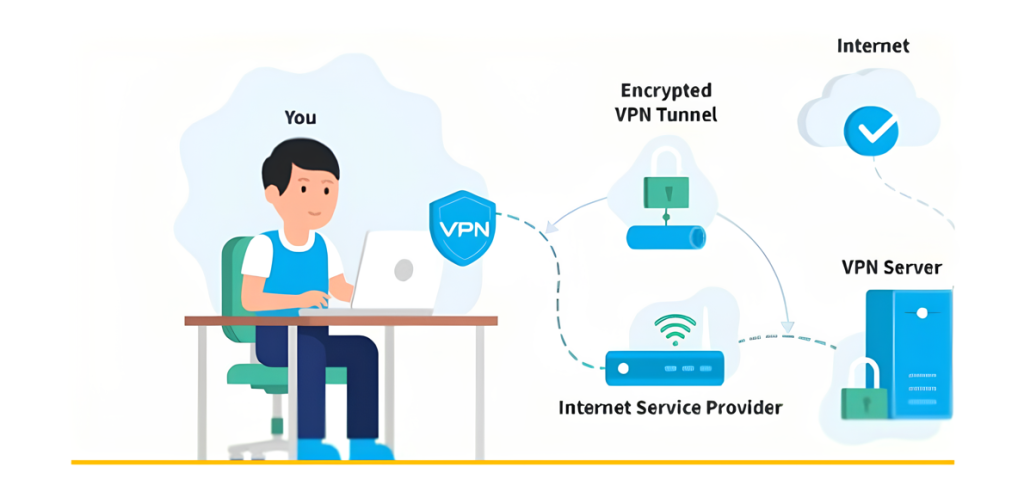
One of the primary reasons everyday users turn to VPNs is for the added security they offer. A VPN encrypts your internet connection, making it difficult for hackers and other third parties to intercept your data. This is particularly beneficial when using public Wi-Fi networks, which are notoriously vulnerable to cyberattacks. With a VPN, your personal information, such as passwords, credit card details, and browsing history, remains protected from potential threats.

However, not all VPNs are created equal. While reputable VPN services prioritize user privacy and security, some free or lesser-known VPNs may do the opposite. These services might log your online activities, sell your data to advertisers, or even contain malware. Therefore, it’s essential for users to research and choose a VPN provider that has a strong privacy policy, does not keep logs, and has positive user reviews.

Another important consideration is the legality and ethical use of VPNs. In some countries, the use of VPNs is restricted or even banned, which can lead to legal consequences if not adhered to. Additionally, while VPNs can help bypass geo-restrictions, they should not be used for illegal activities. Users should be aware of the laws in their region and use VPNs responsibly to avoid potential issues.

For the average user, VPNs also offer the advantage of accessing content that may be restricted based on geographic location. Whether it’s streaming services, news websites, or social media platforms, a VPN can help bypass these blocks by masking your IP address and making it appear as if you are browsing from a different location. This feature is especially useful for travelers or those living in countries with strict internet censorship.

In conclusion, VPNs can be a safe and valuable tool for everyday users, provided they choose a reputable service and use it responsibly. By understanding the benefits and potential risks, users can make informed decisions about their online privacy and security. As more people become aware of the importance of protecting their digital footprint, the use of VPNs is likely to continue growing, making them an essential part of modern internet usage.

Why You Should Consider Using a VPN

In today’s digital age, where online privacy and security are increasingly at risk, using a Virtual Private Network (VPN) has become more important than ever. A VPN creates a secure, encrypted connection between your device and the internet, helping to protect your data from prying eyes. This added layer of security is crucial for anyone who values their privacy, especially when using public Wi-Fi networks or accessing sensitive information online.

One of the primary reasons to use a VPN is to protect your personal information from hackers and cybercriminals. When you connect to the internet through a VPN, your data is encrypted, making it much more difficult for malicious actors to intercept your information. This is particularly important when you’re using public Wi-Fi networks, which are often less secure and more vulnerable to attacks. With a VPN, you can browse, shop, and bank online with greater peace of mind.

Another significant benefit of using a VPN is the ability to bypass geo-restrictions and censorship. Many websites, streaming services, and online platforms restrict access to content based on your geographic location. A VPN allows you to change your IP address to make it appear as if you’re browsing from a different location, giving you access to content that might otherwise be blocked in your region. This is particularly useful for travelers or those living in countries with strict internet censorship.

In addition to security and access, a VPN can also help you maintain anonymity online. Your internet service provider (ISP), advertisers, and even government agencies can track your online activities and build a profile based on your browsing habits. By using a VPN, you can mask your IP address and prevent these entities from tracking your online behavior, helping you maintain a higher level of privacy.

Finally, using a VPN can also improve your overall internet experience. Some ISPs throttle your internet speed when they detect certain activities, like streaming or downloading large files. With a VPN, your ISP won’t be able to monitor your activities as easily, potentially resulting in faster and more consistent internet speeds. Whether you’re streaming, gaming, or simply browsing the web, a VPN can enhance your online experience by providing a smoother and more secure connection.

In conclusion, a VPN is a valuable tool for anyone who wants to protect their privacy, access restricted content, and enjoy a safer and more private online experience. Whether you’re concerned about security, want to bypass censorship, or simply want to maintain your anonymity, using a VPN is a smart choice in today’s digital world.

eSewa Surpasses 10 Million Downloads on Android


Kathmandu – Nepal’s pioneering digital wallet, eSewa, has reached a significant milestone with over 10 million downloads of its mobile app on Android. This achievement was announced by eSewa Limited through a social media post, where they revealed that the app has crossed the 10 million download mark on the Google Play Store, making it the first fintech app in Nepal to do so.

In a message of gratitude, the company stated, “Thank you to everyone who joined us for a million happy moments!”

Jagdish Khadka, the CEO of eSewa, emphasized the company’s commitment to growth, saying, “This journey of eSewa will not stop at 10 million, and we will ensure it continues.”

eSewa offers a wide range of services, including money transfers between eSewa accounts and bank accounts, payments for utilities such as electricity, water, and internet, mobile recharges, TV subscriptions, e-commerce transactions, and premium payments for various insurance companies.

Dishhome to Broadcast SAFF U-20 Championship Live on Action Sports HD

Kathmandu – The SAFF U-20 Championship football tournament, set to kick off in Kathmandu this Sunday, will be broadcast live by Dish Media Network on their Action Sports HD channel.

Action Sports HD, known for its live telecast of the AFC Challenge League qualifiers between Church Boys United and Paro FC, will now bring football fans the excitement of the SAFF U-20 Championship.

The tournament features six teams from South Asia, excluding Pakistan. Nepal, Sri Lanka, and Bangladesh will compete in Group ‘A’, while India, Bhutan, and Maldives will battle it out in Group ‘B’.

This live broadcast promises to bring thrilling football action directly to viewers across the region.

Create new year greeting card easily from mobile

E-cards play an important role in exchanging New Year wishes. When you see e-cards posted by various people on social media or sent to your inbox, you may want to make a similar card.

Today we are giving information on how to make a class e-card from a mobile phone. There are many such apps on the internet with the help of which we can make quality e-cards.

Here we are discussing about two suitable apps that will help you create e-cards easily and as per your wish. Information is given here about two apps that can be used to make e-cards using Nepali font.

Canva

Canva is such a platform, with the help of which we can create new year e-cards using attractive templates. Also, this platform has the facility to create e-cards in your own style.

This app is free. However, to use some special templates and fonts, you have to pay a fee. Download the app by clicking here for Android users and here for iOS users .

After downloading the app, prepare the e-card by following the procedure below.

– First of all open the app.

– Then go to the search bar above and search for ‘New Year Cards’.

– Then choose any template that suits you.

– You can make an e-card as shown in the template.

Canva can design as you want. However, the template may not have the design you are looking for. Therefore, you should know about the tools of the app to create the design you want.

Pixellab

Pixel Lab is an app that can be used to create classy posters and e-cards. It can also be used as Photoshop. Here’s how to go from installing the app to designing a card:

1. App and install fonts in the app

First of all, install the Pixel Lab app by going to this link for Android and this link for iOS.

If English letters are used in the paste you are going to create, then you don’t have to do anything, we can use the default fonts in the app.

However, if you want to use Nepali characters in the poster, you can install the font using the below-mentioned procedure:

To make such posters attractive, we have to use different attractive fonts. 

Go to Google and search Nepali Font Collection Zip File (Nepali Font Collection Zip File) and download the font.

After downloading the font, you need to extract it to the file manager on your smartphone. To extract, you need to find out which folder the zip file of the font you downloaded is in.

Most of the downloaded content on the phone is in the Downloads folder, so you can go there. If you tap on the zip file you downloaded, it will show you the option to extract.

In this way, the font can be extracted to a folder. After this process, the font has to be installed in Pixel Lab.

– To install the font in Pixel Lab, first open the app.

– After opening the app, there is an option written New Text. You tap on it.

-Then tap on the A icon below. Then many options appear above it. 

-If you move it to the left, you will see an option called Font.

-If you tap on the font, a new section will appear, in which you can see three other options.

-If you tap on My Font in the middle, you will see an empty section. Now we have to install the downloaded font in this section. 

– A search box appears below it. Two icons can be seen next to the search box. Out of that you have to choose the last option. 

– After this, the file manager option appears. There, select the font by going to the folder where you extracted the font earlier. Thus, after installing Font Pixel Lab, you can see many fonts in place of My Fonts. 

2. How to design

After the font installation process is over, let’s go to the poster design process. There are many things to consider while designing it.

First of all prepare the outline of the card you are going to make. This means that matters such as where to place the font on the card, and how to keep the background color should be taken care of.    

– First of all select the background color, for that you will see the options at the end of that page. Choose the previous option from the last one. After selecting that option, an option called color will appear, you can tap on it and select the color you need.

– After selecting the caller, go to the third option below. After that, an option called Shapes appears above. When you tap on it, a square box appears. Now you can adjust the size and color of the same box according to your needs.

– Make boxes of different colors like the poster we made.

– After this process is over you should pay attention to two other things; Where to put your photo and where to put the other font?

– If you want to remove the photo background of a photo that you want to keep, you can use a background remover site, such as Remove.Busy .

In this way, you can make a poster like the one shown in the photo from your phone app in a short time.

Where is your photo being used on the internet? Here’s how to find out

Where has our photo been used online? Or who are the people with a face like ours? You may also be bothered by these questions.

‘Reverse face search’ is such a method, which gives information about where photos like us or our own photos have been uploaded on the Internet.

Today we are giving information about such sites, with the help of which you can find out where your photos have been uploaded on the Internet.

google image search

You can search many things not only by putting text in Google, but also by photos. You can search by photo by going to Google’s search bar and clicking on the camera icon or directly by clicking here .

In this way, when searching for photo usage, you can get information about where the photo is uploaded, what the photo is related to.

Google often searches for photos that match the photos you upload. In this way, you can find out where your photo has been uploaded on the Internet. 

pimiez

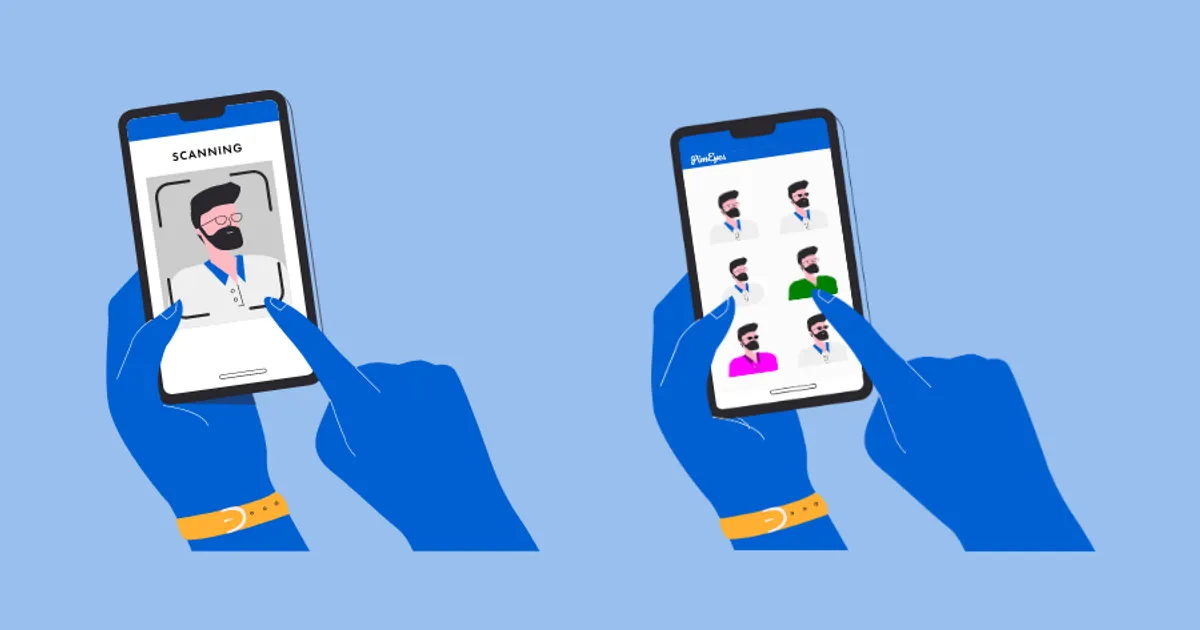
There is a website called ‘PMEyes’ on the internet, through which you can find out where your photos have been uploaded on the internet. 

Specifically, based on the same photo provided by the user, this platform identifies other photos using ‘facial recognition’.

A computer algorithm shows faces that match your photo on online portals, social networks or any other platform. From where you can find out where your photo has been used. 

This platform can be used up to three times for free. Then you have to pay for this platform.

Even if you use it for free, you can see where your photos have been taken. However, not all links on the site are visible. Thus, a fee must be paid to go to the link shown there.

Follow the procedure below to identify photos uploaded to the Internet by PMEyes:

– First of all go to PimEyes official website by clicking here .

– Then click on the ‘Upload a Photo’ section on the PimEyes main page.

– After doing this, select the photo you want to search from the gallery.

– After selecting the photo, click on the ‘Terms and Conditions’ and ‘Privacy Policy’ boxes and click on the ‘Continue’ box.

– After doing this, it shows a face that matches your face and a photo of your own face.

In this way you can search photos of different people up to three times for free. Using this platform for free may not give accurate results. Because deep search or safe search options are not available when using free. 

facecheck id

‘Facecheck ID’ is such a platform, which uses a facial recognition search engine powered by AI. From this, you can identify which online account people have, where their photos are uploaded.

You agree that if you find the photo you want to find on this platform on any platform, you will not blackmail the information or hurt the person. After that, you can get information about where the photo has been uploaded.

tiny eyes

TinyEyes’ reverse image search is almost like Google’s image search. You can search for images by uploading a photo or pasting a photo’s URL link.

However, not all the photos here will suit you. For that, your photo must be uploaded on a publicly available platform.

betaforce

Like other platforms, Betaforce is also a website, with the help of which you can identify where the photo you are looking for is available online. Photos can be searched by uploading photos on this platform or by directly pasting the link.

Apart from these, there are many platforms that help to identify where a photo has been uploaded on the Internet. Under this, you can search online images from platforms like

Ncell’s Volte service now on iPhone too, 2GB data bonus when upgrading to e-SIM

With the new year 2080, Ncell Asiata has launched Voice over Long Term Evolution (Volte) service for iPhone as well. Earlier, the company has launched the Volte service on the Android platform.

“Volte is a new technology in the field of telecommunication services, which provides HD and fast connected voice call services. You can make quality voice calls using the 4G network on Volte. Customers can now enjoy high-quality voice calls and data services at the same time while calling on the 4G network at normal call charges,” the statement issued by the company said.

iPhone users who subscribe to Volte service will get 100 minutes of on-net Volte talk time valid for 28 days. Ncell customers using iPhone 8 and later iPhone series are eligible for Volte service and 100 minutes of bonus talk time. According to the company, eligible customers can dial Estrix 17201 to get the Volte service and receive the bonus.

Along with Volte, Ncell has also introduced another plan for customers using iPhone on its network. Under this, customers who upgrade their physical SIM to e-SIM will get 2GB bonus data valid for seven days.

According to the company, the bonus data is applicable for customers who have purchased iPhone through the official seller of iPhone in Nepal.

iPhone users can upgrade their SIM to e-SIM by dialing 17125. For this, the customer should type his citizenship number, email address and send an SMS to 17125.

Before activating the e-SIM, the customer receives a call from the Ncell representative for customer identification. There is no charge for sending this SMS and for SIM upgrade. Other customers can get a new e-SIM for free from their nearest Ncell.

All Ncell customers across Nepal who have Ncell’s 4G network can take advantage of the Volte service. To benefit from this service, the customer needs to turn on the 4G setting on his Volte enabled mobile set and must be on the 4G network.